브랜드 페이지 카탈로그 페이지 기관 단체 페이지 AI 툴킷
VjQj
무료 진단
요금 안내 사용 가이드
로그인 지금 시작하기

VjQj 플랫폼 매뉴얼

  • 빠른 시작
    • 빠른 시작 안내
  • 시작하기
    • VjQj는 무엇인가요?
    • 이 가이드 사용법
  • 계정 설정
    • 계정 생성
    • 로그인
    • 계정 설정 관리
  • 브랜드 프로필
    • 브랜드 페이지 만들기
    • 이미지 및 동영상 업로드
  • 제품 카탈로그
    • 카탈로그 페이지 만들기
    • 무역 조건 및 설명
  • QR 코드 및 채널
    • QR 코드 개요
    • QR 코드 생성 및 다운로드
    • 채널 추적 및 분석
    • QR 코드 사용 사례
  • 구매자 문의
    • 문의 유형
    • 이메일 알림
    • 문의 검토 절차
    • VjQj 신뢰 시스템
  • 대시보드
    • 대시보드 액세스
    • 대시보드 유형
    • KPI 지표 이해
    • 분석 탭 및 필터
    • 시계열 차트 읽기
    • 페이지 통계
    • 데이터 보안 및 개인정보 보호
  • 지원
    • 지원받는 방법
    • 일반적인 문제
    • 티켓 기록
  • 마케팅 스토어
    • 마케팅 스토어 개요
    • 구매 및 결제
    • 구매 후 관리
카테고리 보기
  • 사용 가이드
  • VjQj 플랫폼 매뉴얼
  • 대시보드

KPI 지표 이해

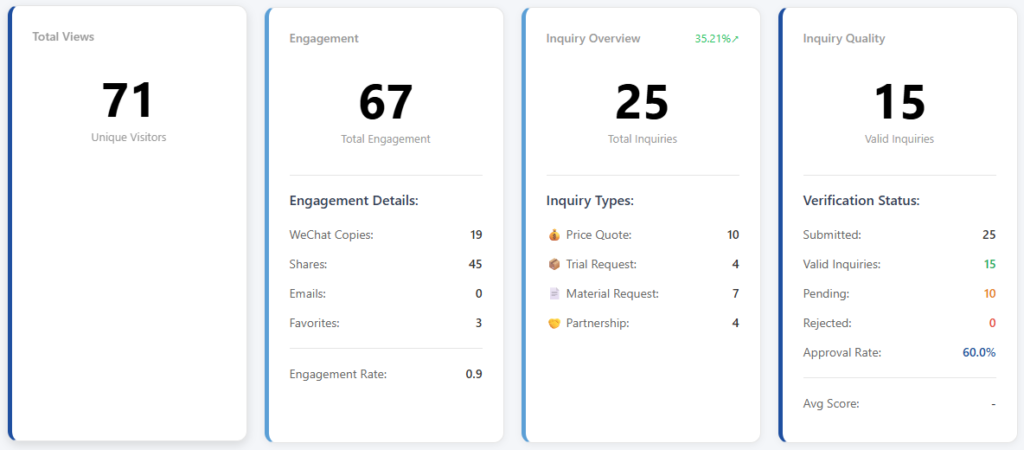
Your dashboard shows 4 KPI cards at the top, followed by a trend chart.

Card 1 — Traffic: how many people saw your page. Card 2 — Engagement: how many people interacted with your page beyond just viewing. Card 3 — Inquiry Overview: how many buyers submitted inquiry forms, by type. Card 4 — Inquiry Quality: how many of those inquiries are real, verified business leads.

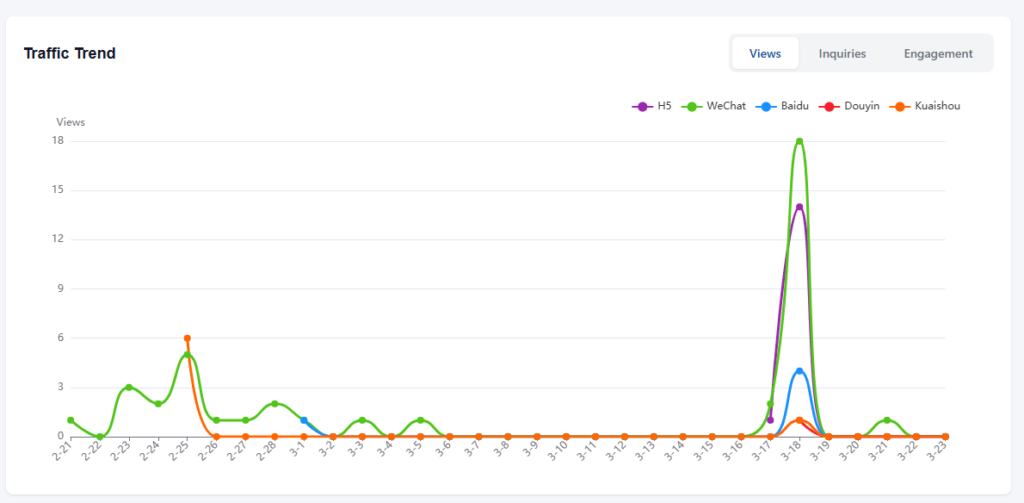
The trend chart below shows daily changes over time, with three tabs: Views, Inquiries, and Engagement.

If you want to understand exactly what each number means and how it's calculated, read on.

Detailed metric reference

Card 1 — Traffic

Views — the number of unique visitors who opened your page. This is a raw count recorded each time a distinct user loads the page. If the same person visits twice in one day from the same device, it counts once.

Card 2 — Engagement

This card tracks what visitors do after they land on your page. There are four individual actions and two calculated metrics.

WeChat Copy — raw count. Each time a visitor taps the button to copy your WeChat ID, this goes up by one. It means someone intends to add you on WeChat, though they may or may not follow through.

Shares — raw count. Each time a visitor shares your page through WeChat (Moments, private chats, or group chats), this goes up by one.

Email Contact — raw count. Each time a visitor taps the email inquiry button, this goes up by one. Important: this counts button taps, not actual emails delivered. Even if the visitor doesn't complete the form after tapping, it still counts. The actual email delivery is handled separately by the system.

Favorites — net count. This is saves minus unsaves. If a visitor bookmarks your page, the number goes up. If they later remove the bookmark, it goes back down. So this number can decrease.

Total Engagement — calculated. This is the sum of all four actions above: WeChat copies + shares + email contacts + favorites.

Engagement Rate — calculated. Total engagement divided by views. If 100 people visited and 8 interactions happened, the engagement rate is 8%. This tells you what percentage of visitors are doing something beyond just looking.

Card 3 — Inquiry Overview

This card counts form submissions. Each number is a raw event count from the inquiry form.

Quote — a buyer submitted a pricing request. Trial — a buyer submitted a sample or trial request. Material — a buyer submitted a request for documents (catalogs, price lists, certifications). Partnership — a buyer submitted a distributor, agent, or OEM cooperation inquiry.

Inquiry Total — calculated. Sum of all four types above.

Inquiry Rate — calculated. Inquiry total divided by views. This is your conversion rate — the percentage of visitors who actually submitted an inquiry. If 200 people visited and 6 submitted inquiries, the rate is 3%.

Card 4 — Inquiry Quality

Not every inquiry is a real business lead. This card tracks the verification status of your inquiries.

Submitted — raw total. Every inquiry that came in, regardless of quality.

Valid — calculated. This is not a simple count. It includes three sources added together: inquiries you manually approved, inquiries auto-approved by the system (when the merchant clicks the verification button in the inquiry email), and inquiries that sat in Pending status for over 14 days without action (the system counts those as valid by default, since no one objected).

Pending — raw count. Inquiries waiting for your review. These have been submitted but not yet classified.

Rejected — raw count. Inquiries you marked as invalid, with a rejection reason (not B2B, unreachable, spam, fraud, or duplicate).

Approval Rate — calculated. Valid divided by submitted, shown as a percentage. A high approval rate means your channels are bringing in real buyers. A low rate means noise.

Average Score — calculated. A quality score averaged across all channels. This factors in the ratio of valid to rejected inquiries per channel, helping you compare which distribution channels bring higher-quality leads.

Trend chart

The line chart below the KPI cards uses ECharts and has three tabs:

Views tab — daily view count over time. Each line can represent a different platform (WeChat, Baidu, Douyin, etc.) when the platform filter is set to "All."

Inquiries tab — daily inquiry submissions over time. Shows total or by type depending on the view.

Engagement tab — daily engagement actions over time.

The x-axis is the date. The y-axis is the count. Spikes usually correspond to specific events — a QR code distributed at a trade show, a KOL post going live, or a paid ad campaign launching. Cross-reference spike dates with your QR distribution timeline to understand cause and effect.

도움이 되었나요?

  • 행복한
  • 정상
  • 슬픈

공유:

  • Facebook
  • X
  • LinkedIn
  • Pinterest
VjQj

해외 브랜드를 위한 완벽한 중국 디지털 거점. 현지 법인 설립도, 복잡한 대행사도, 불필요한 시행착오도 없습니다.

제품

브랜드 페이지 카탈로그 페이지 기관 단체 페이지 AI 툴킷

자원

무료 진단 요금 안내 사용 가이드

시작하기

내 중국 페이지 생성하기 →

무료 시작 · 신용카드 불필요

ICP: 津ICP备2025038813号  연락하기: support@vjqj.com  |  서비스 약관  ·  개인정보처리방침 에 동의하게 됩니다
© 2026 톈진 쉬니우 AI 스튜디오. 모든 권리가 저작권으로 보호됩니다.
링크드인
🌐Language:
English(으)로 언어 변경 English
Korean
OK
Korean
English