VjQj
  • Solutions
    • Direct Buyer
    • Solutions
      • Mini App Generator
      • AI Compliance
      • Data & ROI
    • Key Features
      • China Hosting
      • Channel Optimization
      • Offline Marketing
  • Pricing
  • Infrastructure
  • Docs
    • Quick Start
    • Getting Started
    • Account Setup
    • Brand Profile
    • Product Catalog
    • QR Codes & Channels
    • Buyer Inquiries
    • Dashboard
    • Support
    • Marketing Store
  • Log In
Select Page

VjQj Platform Manual

  • Quick Start
    • Quick Start Guide
  • Getting Started
    • What is VjQj?
    • How to Use This Guide
  • Account Setup
    • Create Your Account
    • Log In
    • Manage Account Settings
  • Brand Profile
    • Create Your Brand Page
    • Upload Images & Videos
  • Product Catalog
    • Create a Catalog Page
    • Trade Terms & Descriptions
  • QR Codes & Channels
    • QR Code Overview
    • Generate & Download QR Codes
    • Channel Tracking & Analytics
    • QR Code Use Cases
  • Buyer Inquiries
    • Inquiry Types
    • Email Notifications
    • Inquiry Review Process
    • VjQj Trust System
  • Dashboard
    • Accessing the Dashboard
    • Dashboard Types
    • Understanding KPI Metrics
    • Analytics Tabs & Filters
    • Reading Time-Series Charts
    • Page-Level Statistics
    • Data Security & Privacy
  • Support
    • How to Get Support
    • Common Issues
    • Ticket History
  • Marketing Store
    • Marketing Store Overview
    • Purchase & Payment
    • Post-Purchase Management
View Categories
  • Docs
  • VjQj Platform Manual
  • Buyer Inquiries

VjQj Trust System

VjQj uses several mechanisms to maintain inquiry quality.

On the buyer side, the form requires email validation, and repeated submissions from the same contact are blocked by a cooldown timer (1-10 minutes depending on type). A hidden honeypot field catches automated spam bots.

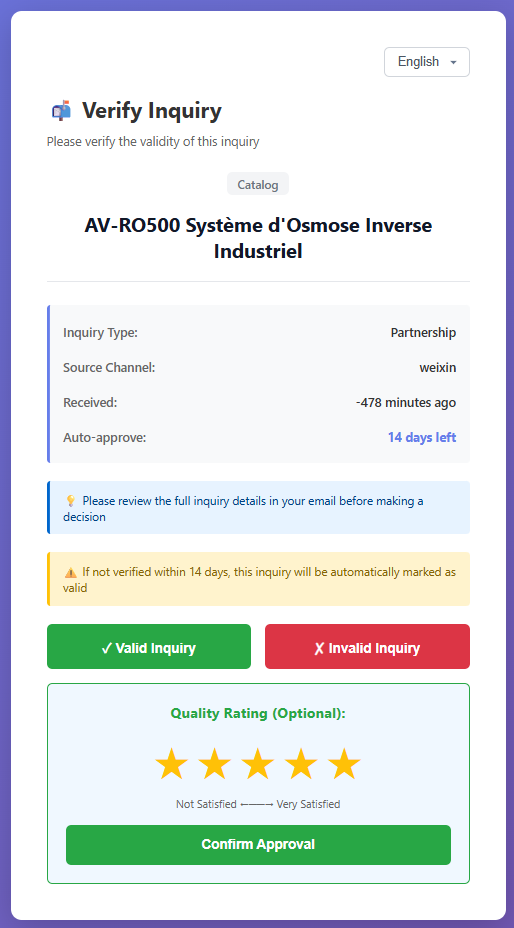
On the merchant side, the email verification button lets you confirm legitimate inquiries. Inquiry quality data (approval rate, average score, rejection reasons) is tracked per channel, so you can see which distribution channels bring real buyers and which attract noise.

Your part: click the verification button in inquiry emails when the lead is real, and mark invalid ones in your dashboard.
Was this helpful?

  • Happy
  • Normal
  • Sad

Share:

  • Facebook
  • X
  • LinkedIn
  • Pinterest
ICP: 津ICP备2025038813号 | Contact: support@vjqj.com | Terms of Service · Privacy Policy
Follow us: LinkedIn
© 2026 Tianjin Xuniu AI Studio. All rights reserved.

