VjQj
  • Solutions
    • Direct Buyer
    • Solutions
      • Mini App Generator
      • AI Compliance
      • Data & ROI
    • Key Features
      • China Hosting
      • Channel Optimization
      • Offline Marketing
  • Pricing
  • Infrastructure
  • Docs
    • Quick Start
    • Getting Started
    • Account Setup
    • Brand Profile
    • Product Catalog
    • QR Codes & Channels
    • Buyer Inquiries
    • Dashboard
    • Support
    • Marketing Store
  • Log In
Select Page

VjQj Platform Manual

  • Quick Start
    • Quick Start Guide
  • Getting Started
    • What is VjQj?
    • How to Use This Guide
  • Account Setup
    • Create Your Account
    • Log In
    • Manage Account Settings
  • Brand Profile
    • Create Your Brand Page
    • Upload Images & Videos
  • Product Catalog
    • Create a Catalog Page
    • Trade Terms & Descriptions
  • QR Codes & Channels
    • QR Code Overview
    • Generate & Download QR Codes
    • Channel Tracking & Analytics
    • QR Code Use Cases
  • Buyer Inquiries
    • Inquiry Types
    • Email Notifications
    • Inquiry Review Process
    • VjQj Trust System
  • Dashboard
    • Accessing the Dashboard
    • Dashboard Types
    • Understanding KPI Metrics
    • Analytics Tabs & Filters
    • Reading Time-Series Charts
    • Page-Level Statistics
    • Data Security & Privacy
  • Support
    • How to Get Support
    • Common Issues
    • Ticket History
  • Marketing Store
    • Marketing Store Overview
    • Purchase & Payment
    • Post-Purchase Management
View Categories
  • Docs
  • VjQj Platform Manual
  • Account Setup

Create Your Account

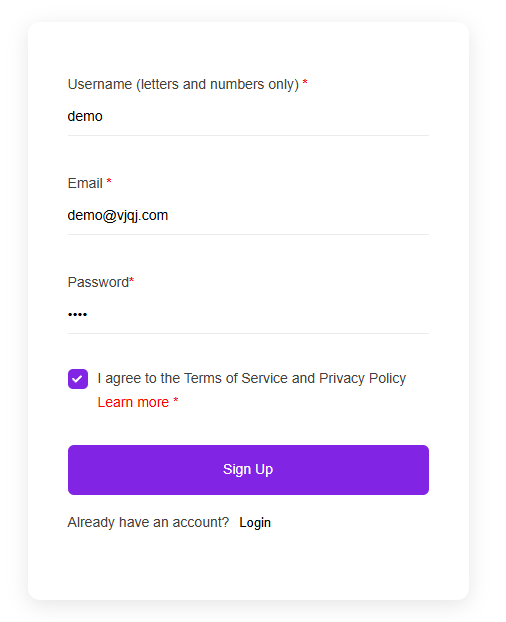
Go to app.vjqj.com and click Sign Up.

You’ll see three fields:

Username — letters and numbers only. This is your login ID and can’t be changed later. Business Email — use a real, monitored address. Buyer inquiry notifications and password resets go here.

Password — a mix of uppercase, lowercase, and numbers. At least 8 characters.

Click Sign Up. If a verification email is sent, click the link to confirm. Check spam if it doesn’t arrive. Some accounts activate automatically without verification.

After logging in, you’ll see the main dashboard. The two areas you’ll use most are My Pages (where you create and manage pages) and My Account (where you manage email, password, and payment).
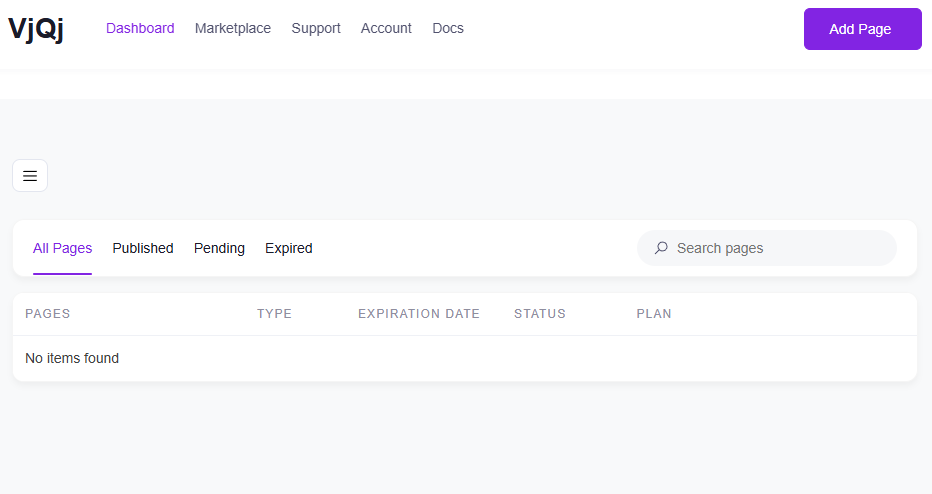
To create pages, you need an active plan. Plans are listed on the homepage under Pricing.

Was this helpful?

  • Happy
  • Normal
  • Sad

Share:

  • Facebook
  • X
  • LinkedIn
  • Pinterest
ICP: 津ICP备2025038813号 | Contact: support@vjqj.com | Terms of Service · Privacy Policy
Follow us: LinkedIn
© 2026 Tianjin Xuniu AI Studio. All rights reserved.