VjQj
  • Solutions
    • Direct Buyer
    • Solutions
      • Mini App Generator
      • AI Compliance
      • Data & ROI
    • Key Features
      • China Hosting
      • Channel Optimization
      • Offline Marketing
  • Pricing
  • Infrastructure
  • Docs
    • Quick Start
    • Getting Started
    • Account Setup
    • Brand Profile
    • Product Catalog
    • QR Codes & Channels
    • Buyer Inquiries
    • Dashboard
    • Support
    • Marketing Store
  • Log In
Select Page

VjQj Platform Manual

  • Quick Start
    • Quick Start Guide
  • Getting Started
    • What is VjQj?
    • How to Use This Guide
  • Account Setup
    • Create Your Account
    • Log In
    • Manage Account Settings
  • Brand Profile
    • Create Your Brand Page
    • Upload Images & Videos
  • Product Catalog
    • Create a Catalog Page
    • Trade Terms & Descriptions
  • QR Codes & Channels
    • QR Code Overview
    • Generate & Download QR Codes
    • Channel Tracking & Analytics
    • QR Code Use Cases
  • Buyer Inquiries
    • Inquiry Types
    • Email Notifications
    • Inquiry Review Process
    • VjQj Trust System
  • Dashboard
    • Accessing the Dashboard
    • Dashboard Types
    • Understanding KPI Metrics
    • Analytics Tabs & Filters
    • Reading Time-Series Charts
    • Page-Level Statistics
    • Data Security & Privacy
  • Support
    • How to Get Support
    • Common Issues
    • Ticket History
  • Marketing Store
    • Marketing Store Overview
    • Purchase & Payment
    • Post-Purchase Management
View Categories
  • Docs
  • VjQj Platform Manual
  • Buyer Inquiries

Email Notifications

When a buyer submits an inquiry, you receive an email within about 5 minutes at the business email set in your page’s Basic Info.

The email is formatted in English and includes:

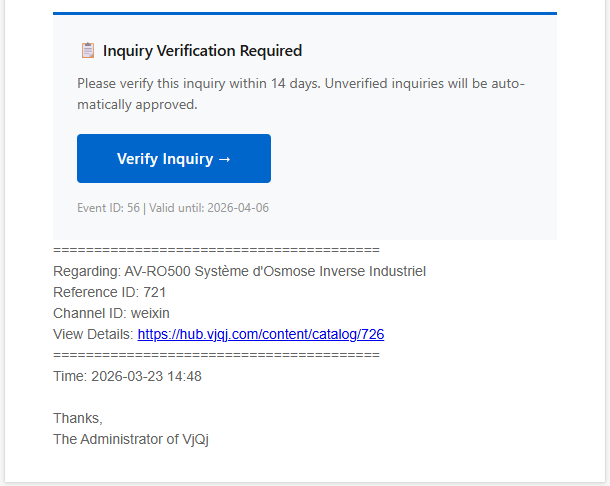
the inquiry type, the buyer’s contact info (email, phone, WeChat, company, role, province, city), all the detail fields they filled in (translated to English using standard B2B terminology), a privacy consent timestamp, and the page and channel ID the inquiry came from.
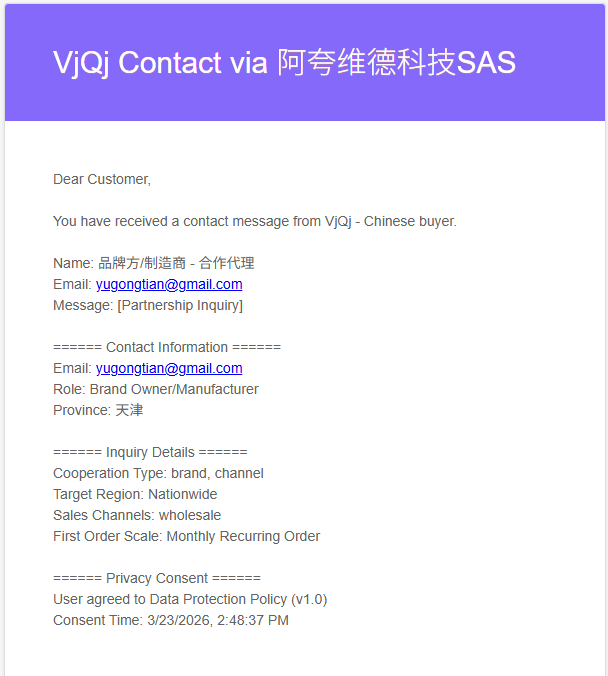
The email also contains a verification button. Clicking it confirms the inquiry is legitimate. This feeds into the inquiry quality scoring in your dashboard.
If you’re not receiving emails: check spam, verify the email in your page settings, and confirm the address under My Account.

Was this helpful?

  • Happy
  • Normal
  • Sad

Share:

  • Facebook
  • X
  • LinkedIn
  • Pinterest
ICP: 津ICP备2025038813号 Contact: support@vjqj.com Terms of Service · Privacy Policy © 2026 Tianjin Xuniu AI Studio. All rights reserved.












