Página da Marca Página do Catálogo Página da Organização Assistente de IA
VjQj
Auditoria Gratuita
Preços Documentos
Entrar Começar →

VjQj Platform Manual

  • Quick Start
    • Quick Start Guide
  • Getting Started
    • What is VjQj?
    • How to Use This Guide
  • Account Setup
    • Create Your Account
    • Entrar
    • Manage Account Settings
  • Brand Profile
    • Create Your Brand Page
    • Upload Images & Videos
  • Product Catalog
    • Create a Catalog Page
    • Trade Terms & Descriptions
  • QR Codes & Channels
    • QR Code Overview
    • Generate & Download QR Codes
    • Channel Tracking & Analytics
    • QR Code Use Cases
  • Buyer Inquiries
    • Inquiry Types
    • Email Notifications
    • Inquiry Review Process
    • VjQj Trust System
  • Dashboard
    • Accessing the Dashboard
    • Dashboard Types
    • Understanding KPI Metrics
    • Analytics Tabs & Filters
    • Reading Time-Series Charts
    • Page-Level Statistics
    • Data Security & Privacy
  • Support
    • How to Get Support
    • Common Issues
    • Ticket History
  • Marketing Store
    • Marketing Store Overview
    • Purchase & Payment
    • Post-Purchase Management
Ver categorias
  • Documentos
  • VjQj Platform Manual
  • Dashboard

Analytics Tabs & Filters

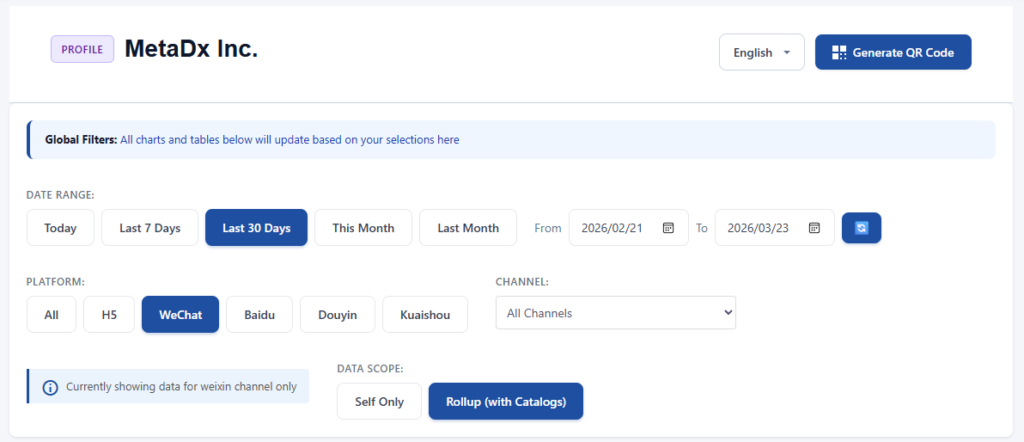
The filter bar sits above the KPI cards.

Date range options: Today, Last 7 Days, Last 30 Days, This Month, Last Month, or Custom (start and end date, max 366 days).

Platform filter: All, H5, WeChat, Baidu, Douyin, Kuaishou.

Data scope (Profile pages only): Self Only or Rollup (includes linked Catalogs).

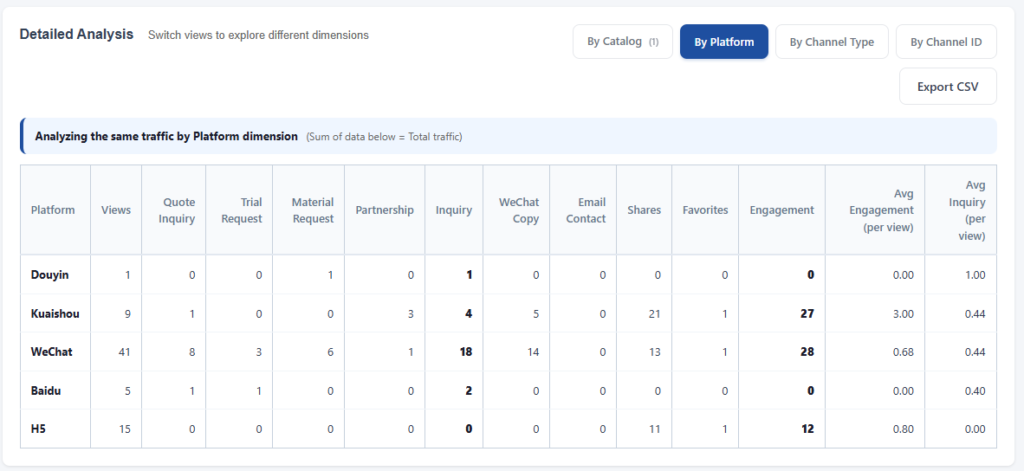
Below the chart is a data table with 6 dimension tabs:

1. By Date — daily breakdown, default for Catalog pages.

2. By Company — per-company breakdown, default for Group mode.

3. By Catalog — shows each Catalog Page separately (available on Profile pages with Rollup).

4. By Platform — aggregated by WeChat, Baidu, Douyin, etc.

5. By Channel Type — aggregated by Campaign, KOL, Ad.

6. By Channel ID — the most granular view. Shows every individual QR code's performance, plus inquiry quality columns: submitted, valid, pending, rejected, approval rate, average score, and top rejection reasons.

Table columns include: views, four inquiry types, inquiry total, WeChat copy, email contact, shares, favorites, engagement total, engagement rate, and inquiry rate. Click column headers to sort.

Export CSV is available on every tab. The file contains anonymized aggregate data, no personal buyer information.

Was this helpful?

  • Feliz
  • Normal
  • Triste

Share:

  • Facebook
  • X
  • LinkedIn
  • Pinterest
VjQj

Presença digital na China para marcas estrangeiras. Sem entidade local. Sem agência. Sem adivinhação.

Produtos

Página da Marca Página do Catálogo Página da Organização Assistente de IA

Recursos

Auditoria Gratuita Preços Documentos

Começar

Gerar Minha Página da China →

Grátis para começar · Não é necessário cartão de crédito

IPC: 津ICP备2025038813号  | Contato: support@vjqj.com  |  Termos de Serviço  ·  Política de Privacidade
© 2026 Tianjin Xuniu AI Studio. Todos os direitos reservados.
LinkedIn
🌐Language:
Alterar o idioma para English English
Alterar o idioma para Korean Korean
Alterar o idioma para Japanese Japanese
Alterar o idioma para German German
Alterar o idioma para French French
Alterar o idioma para Spanish Spanish
Alterar o idioma para Arabic Arabic
Portuguese
Alterar o idioma para Russian Russian
Alterar o idioma para Indonesian Indonesian
Alterar o idioma para Vietnamese Vietnamese
Alterar o idioma para Turkish Turkish
Alterar o idioma para Thai Thai
Alterar o idioma para Hindi Hindi
OK
Portuguese
English Korean Japanese German French Spanish Arabic Russian Indonesian Vietnamese Turkish Thai Hindi