صفحة العلامة التجارية صفحة الكتالوج صفحة المنظمة مساعد الذكاء الاصطناعي
فجق
تدقيق مجاني
التسعير وثائق
تسجيل الدخول ابدأ

VjQj Platform Manual

  • Quick Start
    • Quick Start Guide
  • Getting Started
    • What is VjQj?
    • How to Use This Guide
  • Account Setup
    • Create Your Account
    • تسجيل الدخول
    • Manage Account Settings
  • Brand Profile
    • Create Your Brand Page
    • Upload Images & Videos
  • Product Catalog
    • Create a Catalog Page
    • Trade Terms & Descriptions
  • QR Codes & Channels
    • QR Code Overview
    • Generate & Download QR Codes
    • Channel Tracking & Analytics
    • QR Code Use Cases
  • Buyer Inquiries
    • Inquiry Types
    • Email Notifications
    • Inquiry Review Process
    • VjQj Trust System
  • Dashboard
    • Accessing the Dashboard
    • Dashboard Types
    • Understanding KPI Metrics
    • Analytics Tabs & Filters
    • Reading Time-Series Charts
    • Page-Level Statistics
    • Data Security & Privacy
  • Support
    • How to Get Support
    • Common Issues
    • Ticket History
  • Marketing Store
    • Marketing Store Overview
    • Purchase & Payment
    • Post-Purchase Management
View Categories
  • وثائق
  • VjQj Platform Manual
  • Dashboard

Accessing the Dashboard

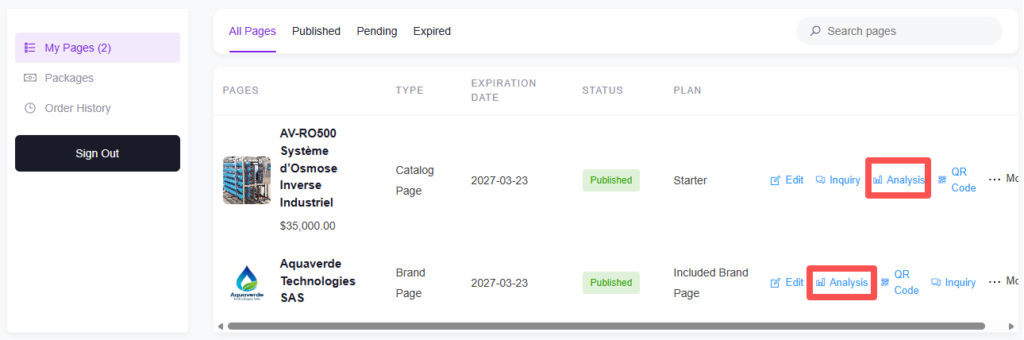
Your analytics dashboard is accessed through a secure signed URL. You don't need to memorize any link — click the analytics entry point in My Pages, and the system generates a time-limited URL (valid for 30 minutes) that takes you directly to your dashboard.

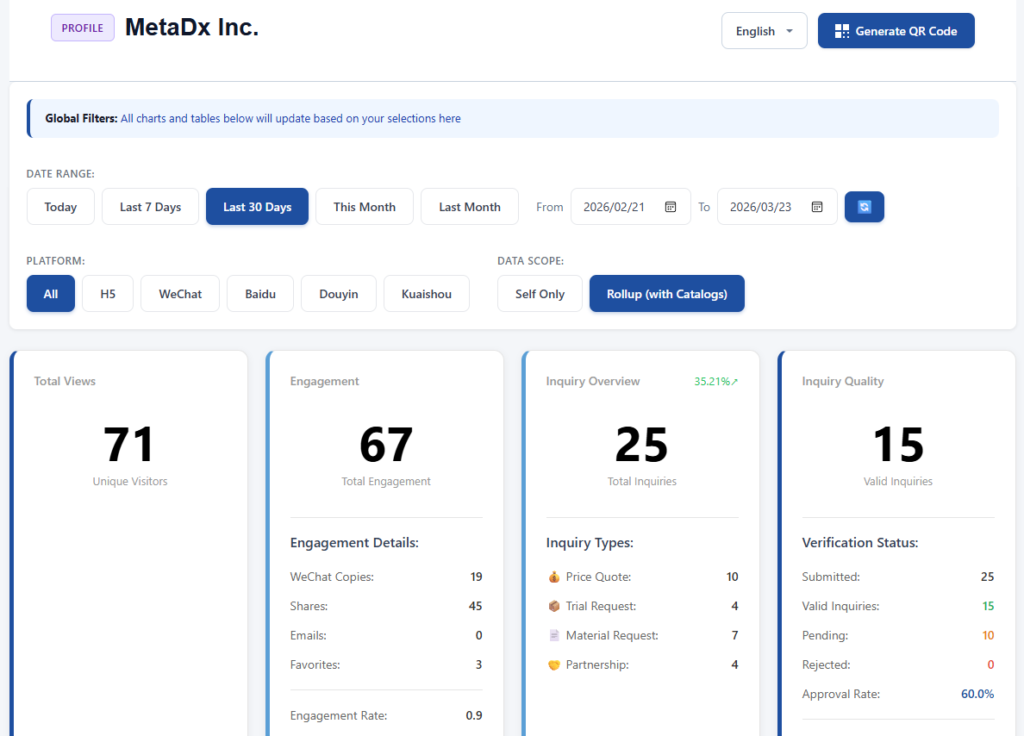
The dashboard supports three languages: Chinese, Korean, and English. Switch using the language dropdown in the top right corner. Your choice is saved for 30 days.

There are two views: Chart View (default, with ECharts line graphs) and Table View (data-only). Switch between them using the view toggle button on the page.

Mobile dashboard for KOL and channel partners:

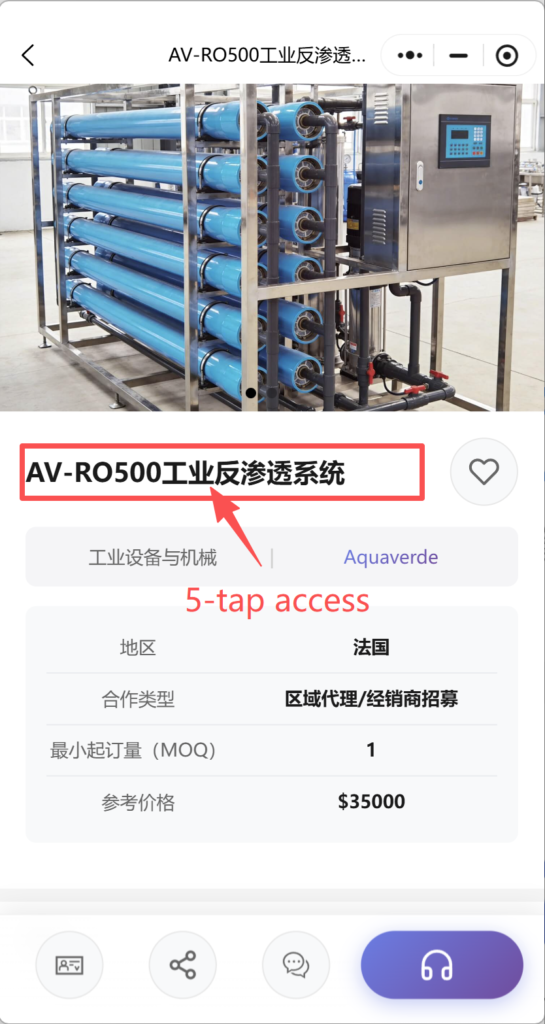
This is a separate, simplified dashboard designed for KOL settlement verification. On any published Brand Page or Catalog Page viewed on a phone, tap the page title 5 times. A mobile analytics view opens, showing that KOL's channel-specific data.

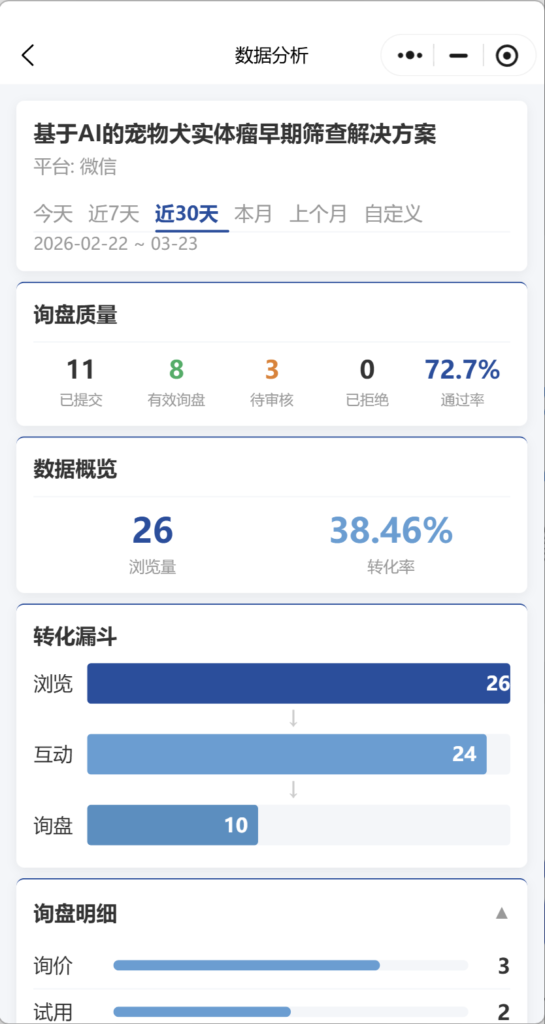
The mobile view has 6 sections:

1. A data summary card with time selector (today, last 7 days, last 30 days, this month, last month, or custom up to 90 days),

2. An inquiry quality block (submitted, valid, pending, rejected, approval rate),

3. A data overview (views and conversion rate),

4. A conversion funnel (views to engagement to inquiries),

5. Inquiry detail (quote/trial/material/partnership breakdown),

6. Engagement detail (WeChat copy, share, email, favorites).

Share the 5-tap access method with your KOL and channel partners so they can see their own performance and verify numbers against your settlement.

Was this helpful?

  • Happy
  • عادي
  • Sad

Share:

  • Facebook
  • X
  • لينكد إن
  • Pinterest
فجق

التواجد الرقمي في الصين للعلامات التجارية الأجنبية. لا كيان محلي. لا وكالة. لا تخمين.

منتجات

صفحة العلامة التجارية صفحة الكتالوج صفحة المنظمة مساعد الذكاء الاصطناعي

موارد

تدقيق مجاني التسعير وثائق

ابدأ

إنشاء صفحتي الخاصة بالصين →

مجاني للبدء · لا حاجة لبطاقة ائتمان

آي سي بي 津ICP备2025038813号  | جهة الاتصال: support@vjqj.com  |  شروط الخدمة  ·  سياسة الخصوصية
© 2026 Tianjin Xuniu AI Studio. جميع الحقوق محفوظة.
لينكد إن
🌐Language:
تغيير اللغة إلى English English
تغيير اللغة إلى Korean Korean
تغيير اللغة إلى Japanese Japanese
تغيير اللغة إلى German German
تغيير اللغة إلى French French
تغيير اللغة إلى Spanish Spanish
Arabic
تغيير اللغة إلى Portuguese Portuguese
تغيير اللغة إلى Russian Russian
تغيير اللغة إلى Indonesian Indonesian
تغيير اللغة إلى Vietnamese Vietnamese
تغيير اللغة إلى Turkish Turkish
تغيير اللغة إلى Thai Thai
تغيير اللغة إلى Hindi Hindi
OK
Arabic
English Korean Japanese German French Spanish Portuguese Russian Indonesian Vietnamese Turkish Thai Hindi