Trang Thương Hiệu Trang danh mục Trang Tổ chức Trợ lý AI
VjQj
Kiểm toán miễn phí
Giá cả Tài liệu
Đăng nhập Bắt đầu →

VjQj Platform Manual

  • Quick Start
    • Quick Start Guide
  • Getting Started
    • What is VjQj?
    • How to Use This Guide
  • Account Setup
    • Create Your Account
    • Đăng nhập
    • Manage Account Settings
  • Brand Profile
    • Create Your Brand Page
    • Upload Images & Videos
  • Product Catalog
    • Create a Catalog Page
    • Trade Terms & Descriptions
  • QR Codes & Channels
    • QR Code Overview
    • Generate & Download QR Codes
    • Channel Tracking & Analytics
    • QR Code Use Cases
  • Buyer Inquiries
    • Inquiry Types
    • Email Notifications
    • Inquiry Review Process
    • VjQj Trust System
  • Dashboard
    • Accessing the Dashboard
    • Dashboard Types
    • Understanding KPI Metrics
    • Analytics Tabs & Filters
    • Reading Time-Series Charts
    • Page-Level Statistics
    • Data Security & Privacy
  • Support
    • How to Get Support
    • Common Issues
    • Ticket History
  • Marketing Store
    • Marketing Store Overview
    • Purchase & Payment
    • Post-Purchase Management
Xem danh mục
  • Tài liệu
  • VjQj Platform Manual
  • Quick Start

Quick Start Guide

Get your first China page live in about 15 minutes. You don't need images or a complete profile to start.

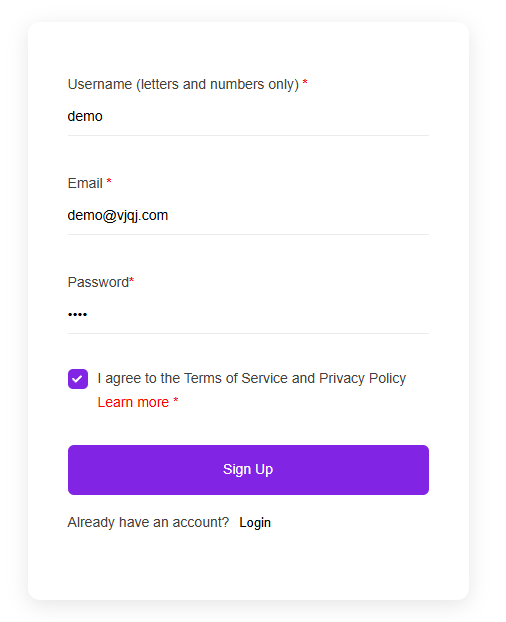
Step 1 — Sign up

Go to app.vjqj.com and click Sign Up.

Fill in three things: a username (letters and numbers, like "company01"), your business email, and a password. Click Sign Up, then check your inbox for a verification email. Look in spam if nothing arrives within a few minutes. Some accounts activate instantly without verification.

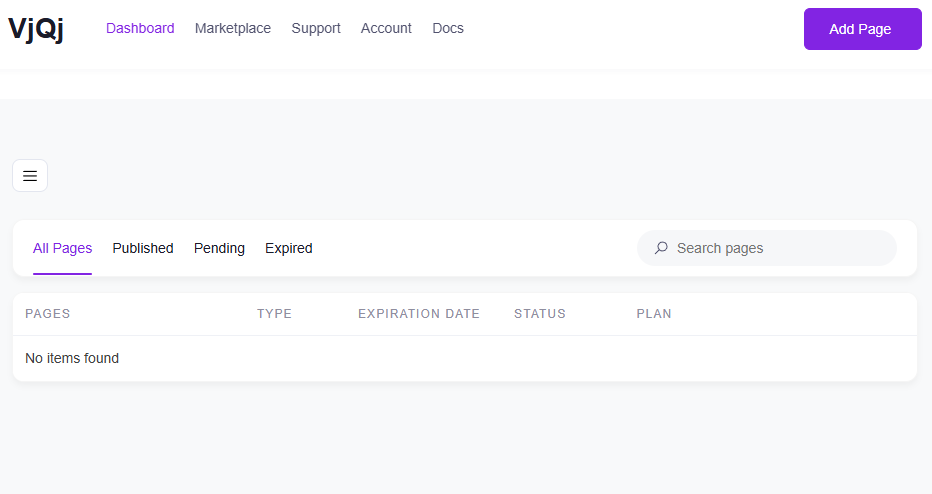
Once logged in, look for My Pages in the top menu. If it's there, your account is ready.

Step 2 — Create a Brand Page

Go to My Pages, click Add New Page, and choose Brand Page.

Fill in these fields:

Company Name — your official name, as you want Chinese buyers to see it. Industry — pick the closest match from the dropdown. Business Email — the address where buyer inquiry emails will be sent.

Everything else is optional for now. Scroll down, check the terms box, and click Submit.

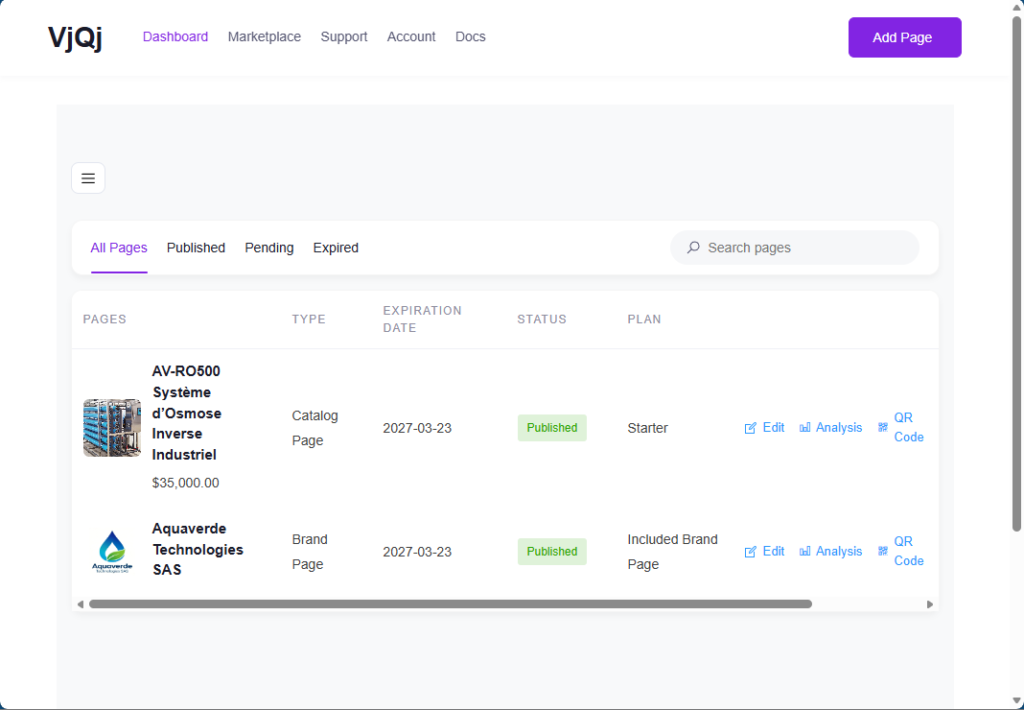
Go back to My Pages. If your company name appears in the list, the Brand Page is created.

Step 3 — Create a Catalog Page

Click Add New Page again, choose Catalog Page.

Your Brand Page will be pre-selected in the Brand Profile field. You can't create a Catalog Page without a published Brand Page.

Fill in:

Product / Service Name — what you're selling. Product Category — pick from the dropdown.

Click Submit. Check My Pages — if your product name shows up alongside your Brand Page, you're set.

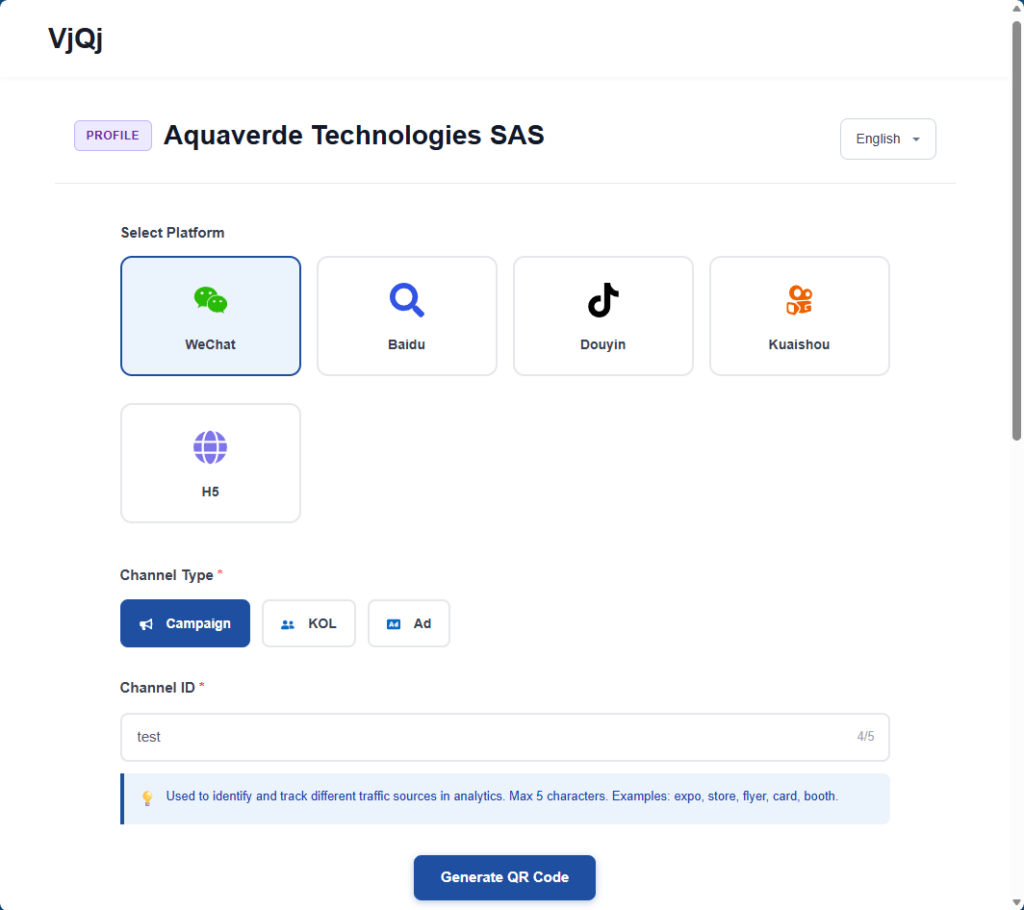
Step 4 — Generate a QR code and test it

In My Pages, click the QR icon next to your page.

Set three fields: Platform — select WeChat. Channel Type — select Campaign. Channel ID — type something like "test" (1-5 characters).

Click Generate, download the QR code image, open WeChat on your phone and scan it. If the page loads inside WeChat, everything is working.

What to do next: go back and complete your Brand Page (logo, company intro, gallery images) and Catalog Page (trade terms, description, photos). The sections below walk through each field.

Was this helpful?

  • Vui
  • Bình thường
  • Buồn

Share:

  • Facebook
  • X
  • LinkedIn
  • Pinterest
VjQj

Hiện diện kỹ thuật số tại Trung Quốc dành cho thương hiệu nước ngoài. Không có pháp nhân địa phương. Không có đại lý. Không phỏng đoán.

Sản phẩm

Trang Thương Hiệu Trang danh mục Trang Tổ chức Trợ lý AI

Tài nguyên

Kiểm toán miễn phí Giá cả Tài liệu

Bắt đầu

Tạo Trang Trung Quốc của tôi →

Miễn phí khi bắt đầu · Không cần thẻ tín dụng

ICP: 津ICP备2025038813号  |  Liên hệ: support@vjqj.com  |  Điều khoản dịch vụ  ·  Chính sách bảo mật
© 2026 Tianjin Xuniu AI Studio. Đã giữ mọi quyền.
LinkedIn
🌐Language:
Chuyển sang ngôn ngữ English English
Chuyển sang ngôn ngữ Korean Korean
Chuyển sang ngôn ngữ Japanese Japanese
Chuyển sang ngôn ngữ German German
Chuyển sang ngôn ngữ French French
Chuyển sang ngôn ngữ Spanish Spanish
Chuyển sang ngôn ngữ Arabic Arabic
Chuyển sang ngôn ngữ Portuguese Portuguese
Chuyển sang ngôn ngữ Russian Russian
Chuyển sang ngôn ngữ Indonesian Indonesian
Vietnamese
Chuyển sang ngôn ngữ Turkish Turkish
Chuyển sang ngôn ngữ Thai Thai
Chuyển sang ngôn ngữ Hindi Hindi
OK
Vietnamese
English Korean Japanese German French Spanish Arabic Portuguese Russian Indonesian Turkish Thai Hindi