Markenseite Katalogseite Organisationsseite KI-Assistent
VjQj
Kostenlose Prüfung
Preise Dokumente
Einloggen Los geht's →

VjQj Platform Manual

  • Quick Start
    • Quick Start Guide
  • Getting Started
    • What is VjQj?
    • How to Use This Guide
  • Account Setup
    • Create Your Account
    • Einloggen
    • Manage Account Settings
  • Brand Profile
    • Create Your Brand Page
    • Upload Images & Videos
  • Product Catalog
    • Create a Catalog Page
    • Trade Terms & Descriptions
  • QR Codes & Channels
    • QR Code Overview
    • Generate & Download QR Codes
    • Channel Tracking & Analytics
    • QR Code Use Cases
  • Buyer Inquiries
    • Inquiry Types
    • Email Notifications
    • Inquiry Review Process
    • VjQj Trust System
  • Dashboard
    • Accessing the Dashboard
    • Dashboard Types
    • Understanding KPI Metrics
    • Analytics Tabs & Filters
    • Reading Time-Series Charts
    • Page-Level Statistics
    • Data Security & Privacy
  • Support
    • How to Get Support
    • Common Issues
    • Ticket History
  • Marketing Store
    • Marketing Store Overview
    • Purchase & Payment
    • Post-Purchase Management
View Categories
  • Dokumente
  • VjQj Platform Manual
  • Support

How to Get Support

VjQj uses a ticket system for all support. Tickets track your issue from submission to resolution and automatically include your page reference.

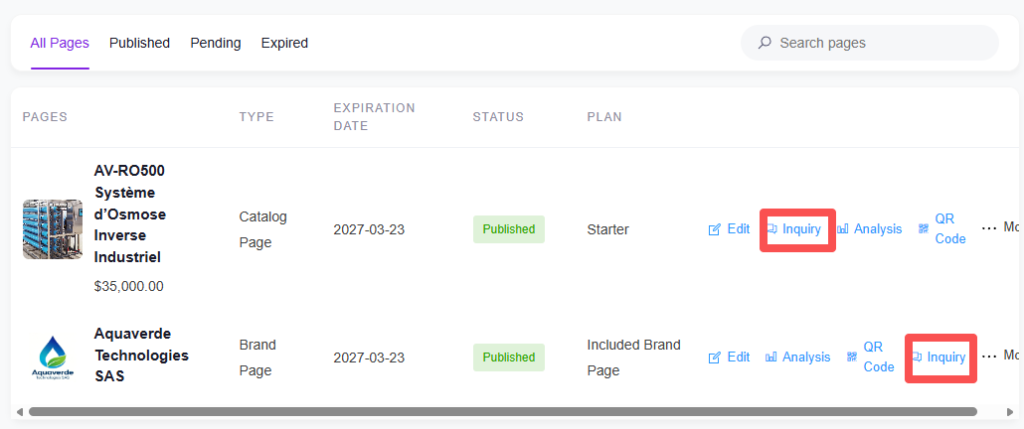
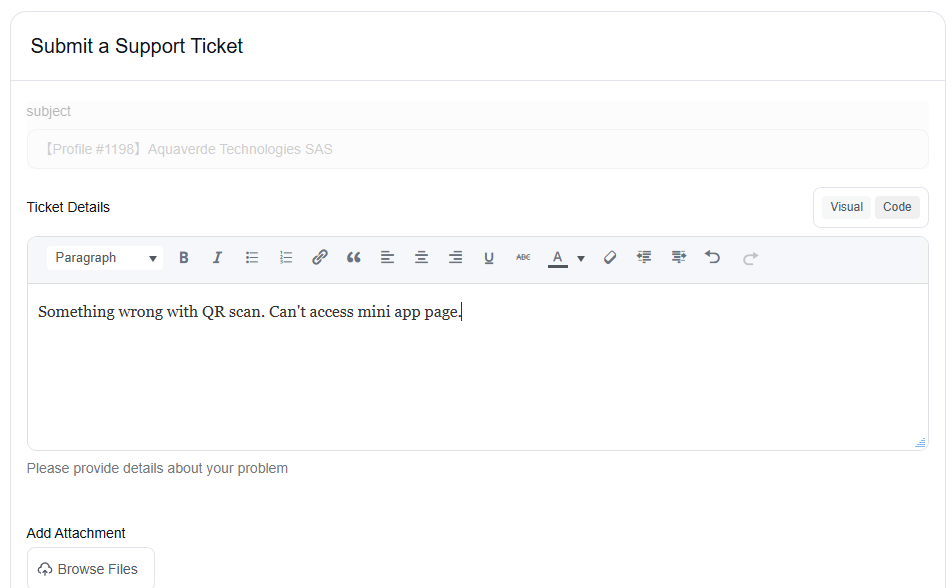
To submit a ticket: go to Support in the top menu and click New Ticket. If you're on a specific page, click the Support button on the right side — the ticket auto-fills with the page reference (like "Catalog #798").

Include a clear title, the steps you took before the problem appeared, and a screenshot if possible.

Ticket statuses: Open means submitted and waiting. In Progress means someone is working on it. Awaiting Customer Info means the team needs something from you — open the ticket, provide what's requested, and click Confirm. Resolved means done.

Was this helpful?

  • Happy
  • Normal
  • Sad

Share:

  • Facebook
  • X
  • LinkedIn
  • Pinterest
VjQj

Chinas digitale Präsenz für ausländische Marken. Keine lokale Niederlassung. Keine Agentur. Kein Rätselraten.

Produkte

Markenseite Katalogseite Organisationsseite KI-Assistent

Ressourcen

Kostenlose Prüfung Preise Dokumente

Los geht's

Meine China-Seite erstellen →

Kostenlos starten · Keine Kreditkarte erforderlich

ICP 津ICP备2025038813号  Kontakt: support@vjqj.com  |  Nutzungsbedingungen  ·  Datenschutzrichtlinie
© 2026 Tianjin Xuniu AI Studio. Alle Rechte vorbehalten.
LinkedIn
🌐Language:
Sprache auf English ändern English
Sprache auf Korean ändern Korean
Sprache auf Japanese ändern Japanese
German
Sprache auf French ändern French
Sprache auf Spanish ändern Spanish
Sprache auf Arabic ändern Arabic
Sprache auf Portuguese ändern Portuguese
Sprache auf Russian ändern Russian
Sprache auf Indonesian ändern Indonesian
Sprache auf Vietnamese ändern Vietnamese
Sprache auf Turkish ändern Turkish
Sprache auf Thai ändern Thai
Sprache auf Hindi ändern Hindi
OK
German
English Korean Japanese French Spanish Arabic Portuguese Russian Indonesian Vietnamese Turkish Thai Hindi