Markenseite Katalogseite Organisationsseite KI-Assistent
VjQj
Kostenlose Prüfung
Preise Dokumente
Einloggen Los geht's →

VjQj Platform Manual

  • Quick Start
    • Quick Start Guide
  • Getting Started
    • What is VjQj?
    • How to Use This Guide
  • Account Setup
    • Create Your Account
    • Einloggen
    • Manage Account Settings
  • Brand Profile
    • Create Your Brand Page
    • Upload Images & Videos
  • Product Catalog
    • Create a Catalog Page
    • Trade Terms & Descriptions
  • QR Codes & Channels
    • QR Code Overview
    • Generate & Download QR Codes
    • Channel Tracking & Analytics
    • QR Code Use Cases
  • Buyer Inquiries
    • Inquiry Types
    • Email Notifications
    • Inquiry Review Process
    • VjQj Trust System
  • Dashboard
    • Accessing the Dashboard
    • Dashboard Types
    • Understanding KPI Metrics
    • Analytics Tabs & Filters
    • Reading Time-Series Charts
    • Page-Level Statistics
    • Data Security & Privacy
  • Support
    • How to Get Support
    • Common Issues
    • Ticket History
  • Marketing Store
    • Marketing Store Overview
    • Purchase & Payment
    • Post-Purchase Management
View Categories
  • Dokumente
  • VjQj Platform Manual
  • Account Setup

Create Your Account

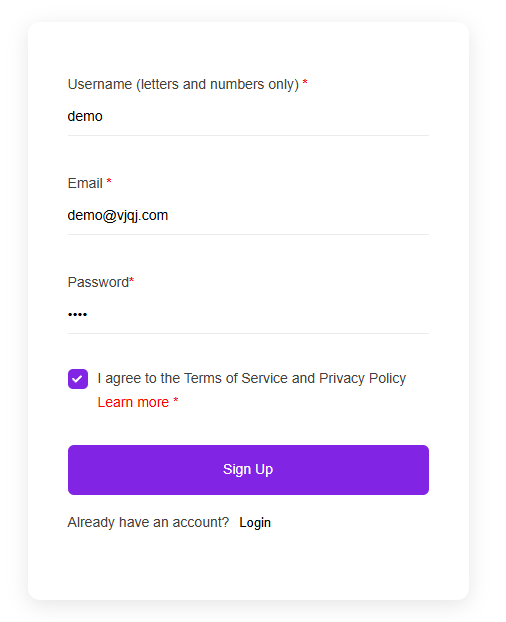
Go to app.vjqj.com and click Sign Up.

You'll see three fields:

Username — letters and numbers only. This is your login ID and can't be changed later. Business Email — use a real, monitored address. Buyer inquiry notifications and password resets go here.

Password — a mix of uppercase, lowercase, and numbers. At least 8 characters.

Click Sign Up. If a verification email is sent, click the link to confirm. Check spam if it doesn't arrive. Some accounts activate automatically without verification.

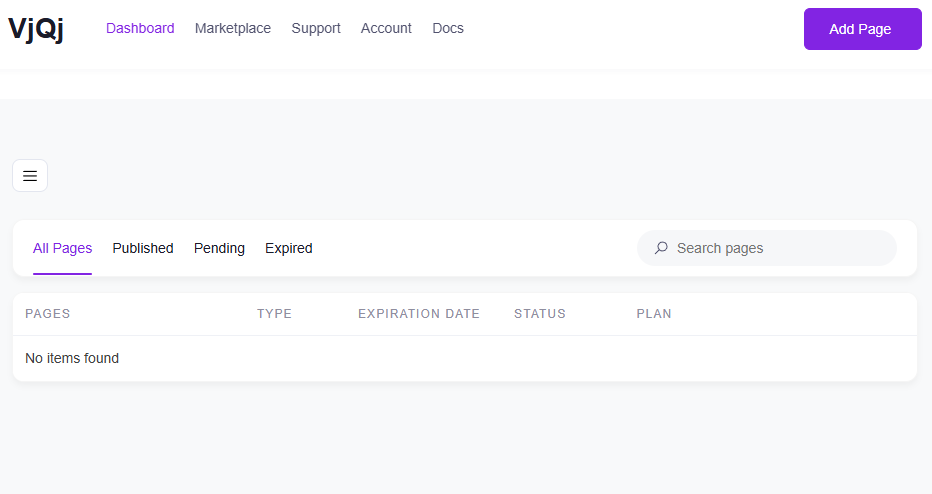
After logging in, you'll see the main dashboard. The two areas you'll use most are My Pages (where you create and manage pages) and My Account (where you manage email, password, and payment).

To create pages, you need an active plan. Plans are listed on the homepage under Pricing.

Was this helpful?

  • Happy
  • Normal
  • Sad

Share:

  • Facebook
  • X
  • LinkedIn
  • Pinterest
VjQj

Chinas digitale Präsenz für ausländische Marken. Keine lokale Niederlassung. Keine Agentur. Kein Rätselraten.

Produkte

Markenseite Katalogseite Organisationsseite KI-Assistent

Ressourcen

Kostenlose Prüfung Preise Dokumente

Los geht's

Meine China-Seite erstellen →

Kostenlos starten · Keine Kreditkarte erforderlich

ICP 津ICP备2025038813号  Kontakt: support@vjqj.com  |  Nutzungsbedingungen  ·  Datenschutzrichtlinie
© 2026 Tianjin Xuniu AI Studio. Alle Rechte vorbehalten.
LinkedIn
🌐Language:
Sprache auf English ändern English
Sprache auf Korean ändern Korean
Sprache auf Japanese ändern Japanese
German
Sprache auf French ändern French
Sprache auf Spanish ändern Spanish
Sprache auf Arabic ändern Arabic
Sprache auf Portuguese ändern Portuguese
Sprache auf Russian ändern Russian
Sprache auf Indonesian ändern Indonesian
Sprache auf Vietnamese ändern Vietnamese
Sprache auf Turkish ändern Turkish
Sprache auf Thai ändern Thai
Sprache auf Hindi ändern Hindi
OK
German
English Korean Japanese French Spanish Arabic Portuguese Russian Indonesian Vietnamese Turkish Thai Hindi